What's working in v0.2.0
I want to be upfront about where things stand. Here's what's fully built, what's partially there, and what's next.
Fully working
- Contact management (add, edit, delete, search, bulk actions)
- Pipeline statuses — including custom stages from Settings
- Tags — create, assign, and filter by tags
- Kanban and table views
- CSV and Excel import with duplicate detection
- Email templates with mail merge variables
- Compose, send, and schedule individual emails
- Gmail and Outlook OAuth integration
- OAuth token refresh — to keep your email connection alive
- Background service — enable in Settings → Appearance to send scheduled emails while the app is closed
- Email sync — threads linked to contacts automatically
- Email signatures — create in Settings, pick when composing
- Emails page — inbox (all accounts, sent/received filter) + scheduled emails view
- Activity timeline — dynamically logs status changes, emails sent, and manual events
- Contact detail page — summary, events, attached files, full email history
- App lock with PIN (Settings → Security)
- Data export as JSON (Settings → Data)
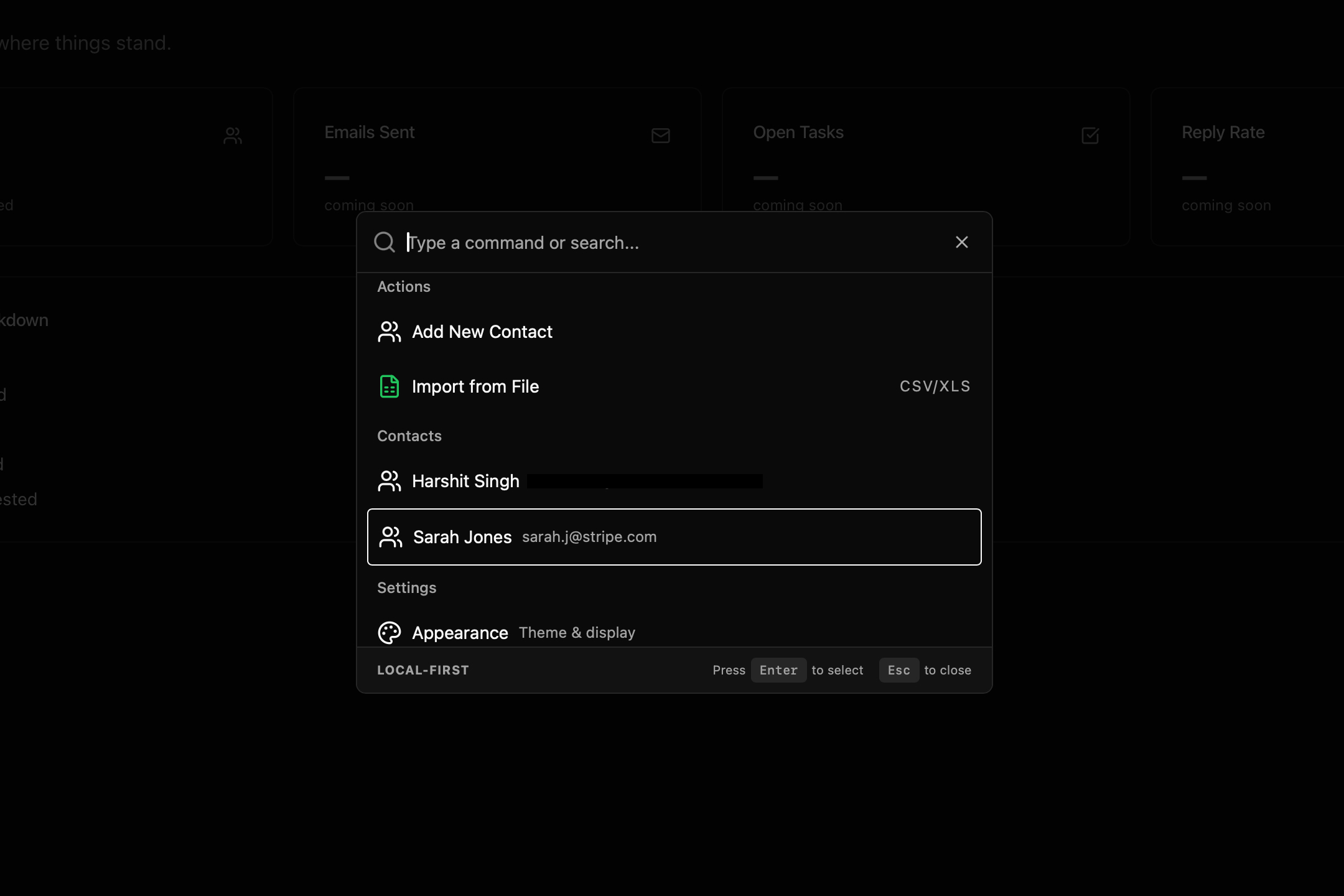
- Command palette — press ⌘K to search or jump anywhere
- Keyboard shortcuts — fully customizable from Settings → Keyboard
- Light, Dark, and System theme modes
Partially built
- Dashboard — Shows real data (total contacts, pipeline breakdown) but some stats panels are still coming-soon placeholders.
Placeholders only (not built yet)
- Tasks page — Scaffold with a realistic layout and a coming-soon note. Will be a job-search to-do list tied to contacts.
- Notes page — Similarly a placeholder.
The next thing I'm building is multi-step email campaigns — sequences of follow-ups that send automatically based on whether the previous one got a reply. After that, email open and click tracking. Both are in progress.
Known issues in v0.2.0
Gmail "app not verified" warning.
When connecting Gmail for the first time, Google will show a warning screen. This is because the app is in testing mode and hasn't been through Google's verification process yet. It's safe to proceed — click "Advanced" and then "Go to JobDex." See Setting up Gmail for full details.
Intel Mac (x86_64) is not supported.
The current release only ships a native Apple Silicon (aarch64) build for macOS. Intel Mac support is not planned for the near term.
Platform-specific issues may exist.
I develop and test primarily on macOS Apple Silicon. If you hit a Windows or Linux bug that isn't listed here, please report it — it's almost certainly something I can fix once I know about it.
Understanding error codes
If something goes wrong under the hood, you might see a toast notification with a short error code (like ERR-DB). I built it this way so that if you run into a bug, you don't have to decipher a wall of developer text — you can just tell me the code.
Here's what they mean if you ever see one:
ERR-DB (Database Error)
Something went wrong with the local database. Usually, this means the app tried to do something SQLite didn't like, or the database file got temporarily locked. If you see this, restarting the app often clears it up.
ERR-INT (Internal Error)
A catch-all for unexpected backend failures. Basically, the app hit a scenario I didn't plan for. If this happens consistently, please report it.
ERR-SER (Serialization Error)
JobDex failed to pass data between the frontend and the backend. This usually means the data format got corrupted or malformed somewhere along the line.
If any of these keep happening, let me know. Include the error code and what you were doing when it popped up — it makes tracking down the bug ten times faster.
Security & your data
Privacy isn't a feature I tacked on — it's the reason this project exists. Here's exactly how your data is protected.
Encryption at rest
Your entire database is encrypted using SQLCipher — a battle-tested encryption layer for SQLite. Even if someone copies the database file from your computer, they can't read it without the encryption key.
The encryption key is a 256-bit key stored in your OS keychain (macOS Keychain or Windows Credential Manager). It never touches the filesystem as a plaintext file.
On top of that, sensitive data like OAuth tokens are further encrypted using AES-256-GCM before being written to the database. Two layers of encryption for the things that matter most.
App lock (PIN)
You can set a PIN from Settings → Security to lock the app when you step away. The PIN is hashed with PBKDF2 (100,000 iterations) — it's never stored in plaintext. This is the same standard used by password managers. You can remove the PIN at any time (you'll need to enter the current one first).
Your data stays local
Everything — contacts, emails, templates, settings, files — lives on your machine. Nothing is sent to any server. The only network requests JobDex makes are:
- Gmail/Outlook API calls to sync and send email (only when you've connected an account)
- OAuth token refresh (to keep your email connection alive)
There is no analytics, no telemetry, no crash reporting, no tracking of any kind.
Data export & clear
From Settings → Data:
- Export — downloads all your data as a JSON file (contacts, statuses, settings)
- Clear all data — permanently deletes everything. This is destructive and asks for confirmation. There's no undo.
Where your data lives
- macOS:
~/Library/Application Support/com.jobdex.desktop/ - Windows:
C:\Users\<you>\AppData\Roaming\com.jobdex.desktop\
Got a question or found a bug?
JobDex is a personal project — it's just me building this. I genuinely want to hear from people using it, whether it's a bug report, a feature idea, or just telling me something felt confusing.
Want to contribute?
JobDex is fully open source — the code is on GitHub and I'd genuinely love help from other developers. There's no formal process, no contributor agreement to sign. If you see something you want to fix or build, open a PR. Even small things: typos, a cleaner query, a UI detail that's been bugging you. All of it is welcome.
The developer wiki has the architecture overview, setup instructions, and a breakdown of how the Rust + React layers fit together. The stack is Tauri 2 (Rust) + React + TypeScript + SQLite — if any of that excites you, come take a look.
The features I most want help on right now: the background email service, the activity timeline, and the Emails page. If you've built something like that before and want to take a crack at it, I'm here to review and ship fast.